
Find out in this tutorial how to change the WordPress categories block separator with a little bit of code.
The terms and categories block displays by default a comma (,) to separate items when there are more than one. This is fine when you want to display them as text, but if you want to change the layout you may prefer not to display the separator.
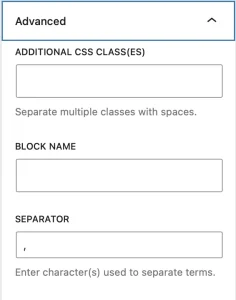
You can change this by going to the block’s advanced section:

But if you have already introduced this block in many places on your website or you just don’t want to change it every time you use it, here’s how to use a WordPress filter to save you a lot of time.
Here we go.
Snippet to change the separator of the WordPress terms and categories block
Add the following code at the end of functions.php or in your functionality plugin:
To see this and another 1097 code snippets of this website, login or subscribe here.
In this code you use the render_block_data filter to identify the categories blocks(core/post-terms) and modify the separator attribute that controls what will be displayed to separate the categories.
In the example above you indicate that it should not display anything, but you can enter there the separator that you want.
If you want this to apply only to certain pages or blocks you can combine the above code with conditional tags.
Conclusion
Now you know how to change the WordPress categories block separator with a little bit of code.
Any questions? I read you in the comments.
And if you want to give me any suggestion for future tutorials, leave it in the contact form. Advantages of being a subscriber. 😉
